
| Author | Message |
|
|
|
As Mo says, I\'m collecting iceworlds in an attempt to gather evidence about what their cause might be: good progress is being made.
What I need is the \'playback\' file at the moment the iceworld freezes. This may seem like a hard thing to do, but it\'s not really. Playback files are generated when graphics recording is turned on (by pressing Control-Q when the graphics are running). The files accumulate in the \'tmp\' folder for the model - e.g. \'T:\\Data\\BOINC\\projects\\climateprediction.net\\hadsm3mh_ktk0_006316540\\tmp\' for a Windows model I\'m recording at the moment - but your model will be in a slightly different place. The files have the extension \'.cpdn\' (e.g. \'hadsm3mh_ktk0_006316540.0021574.cpdn\') and are about 120 kB, so the amount of disk space used rises rapidly. When the iceworld freezes, the size of the file drops to about 8 kB (and 3 kB eventually). The file I need is the last full-size \'.cpdn\' playback file before the drop.
To do this you would need to make a backup of your current working installation, then restore a backup from before the freeze. Turn network activity off and re-run the iceworld until it freezes. Send me the single \'.cpdn\' file and then delete the iceworld installation and restore the working installation. Then carry on as normal.
If you would rather just get on with some more processing, then just ignore this post! I quite understand.
Thanks,
Iain
PS By the way, the graphics do not need to be left running when the recording has started. However, make sure you\'ve got enough disk space: one phase is 10802 * 24 * 120 kB = ~30 GB, though you shouldn\'t have to run it that long. |
|
|
mo.vForum moderator
 Send message Joined: Sep 29 04 Posts: 2270 Credit: 5,359,391 RAC: 1,327
|
|
Thanks for unhiding your computer. Is this the iceworld model?
What a lot of models you\'ve processed for CPDN.
____________
Cpdn news
5 CPDN READMEs |
|
|
|
|
Thanks for unhiding your computer. Is this the iceworld model?
What a lot of models you\'ve processed for CPDN.
Yes that is it. I have kept backups every day to ensure I don\'t corrupt too many. Spybot destroyed a few when I was in graphics mode. I fully support your aims and we can only change things if we give enough details to sway the doubters.
Dibb
____________
|
|
|
|
|
As Mo says, I\'m collecting iceworlds in an attempt to gather evidence about what their cause might be: good progress is being made.
What I need is the \'playback\' file at the moment the iceworld freezes. This may seem like a hard thing to do, but it\'s not really. Playback files are generated when graphics recording is turned on (by pressing Control-Q when the graphics are running). The files accumulate in the \'tmp\' folder for the model - e.g. \'T:\\Data\\BOINC\\projects\\climateprediction.net\\hadsm3mh_ktk0_006316540\\tmp\' for a Windows model I\'m recording at the moment - but your model will be in a slightly different place. The files have the extension \'.cpdn\' (e.g. \'hadsm3mh_ktk0_006316540.0021574.cpdn\') and are about 120 kB, so the amount of disk space used rises rapidly. When the iceworld freezes, the size of the file drops to about 8 kB (and 3 kB eventually). The file I need is the last full-size \'.cpdn\' playback file before the drop.
To do this you would need to make a backup of your current working installation, then restore a backup from before the freeze. Turn network activity off and re-run the iceworld until it freezes. Send me the single \'.cpdn\' file and then delete the iceworld installation and restore the working installation. Then carry on as normal.
If you would rather just get on with some more processing, then just ignore this post! I quite understand.
Thanks,
Iain
PS By the way, the graphics do not need to be left running when the recording has started. However, make sure you\'ve got enough disk space: one phase is 10802 * 24 * 120 kB = ~30 GB, though you shouldn\'t have to run it that long.
Iain
I have run (4adsm3fub_kgbp_005985944_7) till it started to turn blue. But I am having trouble finding the file you want. Can you tell me where it is?
Dibb
____________
|
|
|
|
|
Thanks for unhiding your computer. Is this the iceworld model?
What a lot of models you\'ve processed for CPDN.
Mo
Which file does Iain want? he said \".cpdn\" file but I can\'t see one with that attribute
Dibb
To do this you would need to make a backup of your current working installation, then restore a backup from before the freeze. Turn network activity off and re-run the iceworld until it freezes. Send me the single \'.cpdn\' file and then delete the iceworld installation and restore the working installation. Then carry on as normal
____________
|
|
|
|
|
|
Dibb,
There are various ways to install BOINC and the files can end up in different places depending on the choices made during installation. Your machine is running Windows XP, so the \'tmp\' folder in which the playback files are stored will be something like:
C:\\Documents and Settings\\All Users\\Application Data\\BOINC\\projects\\climateprediction.net\\hadsm3fub_kgbp_005985944_7\\tmp
If graphics recording was turned on before the iceworld froze, then the \'tmp\' folder should now be filled with thousands of files all ending \'.cpdn\'. The earlier files will be about 120 kB and the later files about 8 kB.
The file I need is the last full-size one (i.e. 100-120 kB) before the file size drops.
Once the file has been identified, I can send a private message on this board with an e-mail address to which the file can be sent.
Thanks for re-running the iceworld. That\'s very good of you.
Iain
[Edit: the BOINC FAQ lists a number of places where BOINC may have installed its data files: The Big BOINC 6 Answer Thread.] |
|
|
|
|
Dibb,
There are various ways to install BOINC and the files can end up in different places depending on the choices made during installation. Your machine is running Windows XP, so the \'tmp\' folder in which the playback files are stored will be something like:
C:\\Documents and Settings\\All Users\\Application Data\\BOINC\\projects\\climateprediction.net\\hadsm3fub_kgbp_005985944_7\\tmp
If graphics recording was turned on before the iceworld froze, then the \'tmp\' folder should now be filled with thousands of files all ending \'.cpdn\'. The earlier files will be about 120 kB and the later files about 8 kB.
The file I need is the last full-size one (i.e. 100-120 kB) before the file size drops.
Once the file has been identified, I can send a private message on this board with an e-mail address to which the file can be sent.
Thanks for re-running the iceworld. That\'s very good of you.
Iain
[Edit: the BOINC FAQ lists a number of places where BOINC may have installed its data files: The Big BOINC 6 Answer Thread.]
IAIN
I have the file identified now. Where do I send it
Dibb
____________
|
|
|
|
|
I have the file identified now. Where do I send it
I have just sent you my e-mail address in a private message on this message board. You should be able to read the message using the \'Inbox\' link at the top-right of the page.
(If that doesn\'t work I\'ll create a public address on Hotmail or the like and post it here.)
Thanks for your efforts.
Iain
|
|
|
|
|
|
Dibb,
That was a text-book iceworld: thank you for taking the trouble to find it and send it over.
The slab model went out of bounds in temperature and pressure on the west coast of North America. Here is an image of the models analysed so far: your model is the second of the north-western pair. All ice worlds so far have crashed in the ocean adjacent to land. Two other models show the same behaviour in the Mediterranean. Given all the possible coastal locations for a crash, presumably the limited latitude range is significant - however, that\'s a matter for the project physicists.
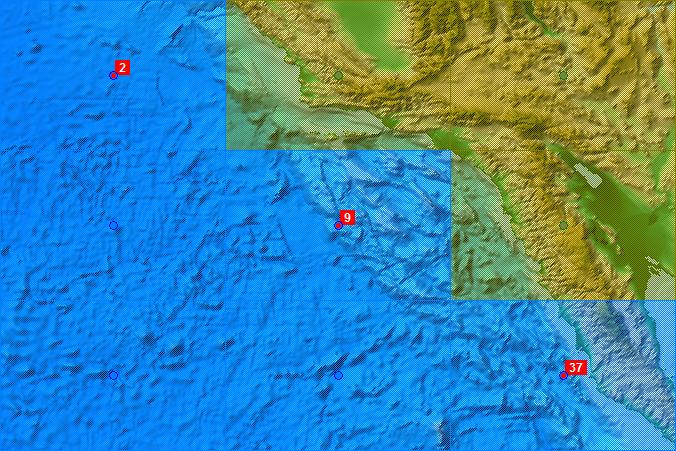
Green tinted rectangles/blobs are model land, blue tinted are model ocean.
Iain |
|
|
|
|
These graphics are amazing.
I think we should get these very interesting posts about iceworlds and Iain\'s graphics into a thread of their own because the iceworld phenomenon is not connected to the \'client detached\' redesignation.
If Dibb and Iain don\'t object I\'ll split this thread after about 12 hours. A relevant title would make the iceworld posts more easily searchable.
Everything has been sorted out between us now. My detached WU still show as new even though I have aborted the Iceworld and finished the other Slab. Do you have any follow up as to when it will show as completed?
Dibb
____________
|
|
|
|
|
|
Dibb has kindly sent me another slab iceworld, and the previous graphic has been updated accordingly.
This brings the total number of iceworlds processed in this way to 19: 9 slabs and 10 mid-holocene, all Windows, split 18 Intel and 1 AMD. I would be particularly interested in a Darwin or Linux/AMD fast-processing iceworld if anyone\'s got one (i.e. prepared to re-run a backup of one, or spotted an iceworld ahead in the work unit and prepared to switch on the graphics recording and send over the playback file at the crash point).
(So far as I can tell Linux/Intel does not have iceworlds.)
Thanks. |
|
|
|
|
|
Hi Iain, I have another iceworld today H S E. Just copying yesterday\'s backup to re-run it. I\'ll send you the requested files when it crashes.
____________
|
|
|
|
|
Hi Iain, I have another iceworld today H S E. Just copying yesterday\'s backup to re-run it. I\'ll send you the requested files when it crashes.
Thanks. I guess we\'re on the tail end of the the mid-holocene models, but they behave exactly the same as the slabs from what I can tell. Originally, I thought MHs produced more iceworlds, but that was just because I\'d had a really bad run - now I\'ve processed more the rate seems a bit less, if anything (MH phases 2 and 3 have relatively fewer freezes). So I suspect that switching back to slabs will increase the hit rate somewhat. |
|
|
|
|
|
Iain, the backup server running your task failed overnight (a dodgy second HDD). The task has continued OK after disconnecting the offending HDD. It\'ll be a couple of days to get to the crash point.
The WU has 8 companion tasks. It looks like task 9363338 H S E has crashed at/around the same point in phase 4. Task 9363340 is on Intel/Linux but not progressed as far yet. The rest are Intel with a mixture of MS variants.
____________
|
|
|
|
|
|
Iain, the files are on their way to you.
Edit: typo.
____________
|
|
|
|
|
|
Hi Ian:
I have an early, slow processing ice world for you. WU hadsm3fub_jwtx_006408687_1 froze at 14.96% at 26/8/1817 at 10:30. All clouds have disappeared and the temp graphic is uniformly blue. I am running Windows 7RC on an Intel core2duo 1.5 GHz processor with 2 GB’s of RAM. The machine was otherwise idle at the time.
I restored from a backup, and ran it to freeze up again with “record“ running. The file contains the last 13 days of graphics.
I have isolated what I think is the right file in the temp folder (there are 655 of them). Now that I have the file how do I send it to you?
____________
|
|
|
|
|
|
Thanks Jim.
I\'ve sent a private message with a suitable e-mail address. The PM should appear by following the \'Inbox\' link at the top-right of the thread pages.
I\'ll process the file and plot the result on a map, or increment the count if the model has crashed in the same place as a previous model.
PS hagar\'s file seems to have arrived ok - thanks. |
|
|
|
|
|
Thanks to JIM and hagar for a slab and a mid-holocene iceworld. These have now been processed through the plotting software: one froze in phase 1 and one in phase 4 - but both froze at the same location off the west coast of North America. The image earlier in this thread has been updated accordingly, with points #14 and #15 at the south-eastern extreme attributable to these latest models.
PS The single AMD/Windows model I\'ve received so far - thanks mo.v! - froze in the Mediterranean, so adding to that category might be productive if anyone has such a thing (an AMD/Windows iceworld speeds up when it freezes, so it\'s easily missed).
Keep \'em coming. |
|
|
mo.vForum moderator
 Send message Joined: Sep 29 04 Posts: 2270 Credit: 5,359,391 RAC: 1,327
|
|
Iain, I have another. It\'s a HadSM slab running on the Intel, slow-processing in phase 3. I\'m running a couple of beta models on the same machine and they\'ll have to be finished first for Tolu. After that I\'ll restore the backup.
I think you should copy this appeal to the News thread of both forums to get more results particularly on AMD.
____________
Cpdn news
5 CPDN READMEs |
|
|
|
|
|
Thanks, Mo. Now I\'m back from holiday, I should really write a coherent set of instructions so that no-one runs into any trouble when restoring a backup. (However, my first priority this weekend is to fill in all the holes dug by foxes while we were away - they dug into and emptied the compost bin among other incursions. Grrr.)
I\'m running out my accumulated mid-holocene models and it\'ll be slabs from then on ... |

|
|
|
|
|
Hi Iain, assume you are still collecting iceworlds?
Got first one for ages. Spotted it (phase 2, at 62.96%) when doing usual morning check
which is essential now that I\'m running 9 slabs (+ one good ol\' CM3). This one here.
It turned blue early this morning soon after phase 2 timestep 226,842 which is 62.5% progress.
Have restored from backup taken at 8am yesterday but have suspended the quad\'s
other 3 models to help the iceworld get to the point as quickly as possible. Currently at 56%.
Will send you the .cpdn file probably tomorrow (Monday). Just need your email address.
|
|
|
|
|
Hi Iain, assume you are still collecting iceworlds? Sure am.
Just need your email address. PM on its way.
Thanks.
It doesn\'t look like anyone else in that WU is going to produce anything useful...

... though it looks like you put your foot on the gas at trickle #3! |
|
|
|
|
... though it looks like you put your foot on the gas at trickle #3!
Sort of. Transferred the quads from a slower m/c after #3.
|
|
|
|
|
|
P.S. Like the chart but can you explain the Y axis \"spot (relative)\" please? |
|
|
|
|
P.S. Like the chart but can you explain the Y axis \"spot (relative)\" please?
Sorry: I use these charts to spot iceworlds - so it\'s really seconds/timestep vs trickle number. The seconds/timestep number on the BOINC Web site is cumulative so I take the difference between adjacent values to get a \"spot\" value, then divide by the seconds/timestep value for the first trickle to get a relative value. The graph then starts at 1.0 and all results within a work unit can be plotted on the same graph.
[PS It\'s pChart, which has a slightly odd franglais interface - but it does the job.] |
|
|
|
|
|
Thanks for the explanation.
So the restored model now goes past the point when it turned blue!
Had even aborted it yesterday, but it has trickled up at the next
timestep. Will just keep an eye on it and take more frequent backups
in case it hits another wall further on.
Sorry not to supply another iceworld for your collection! |
|
|
|
|
Sorry not to supply another iceworld for your collection! Good news for you ...
Collecting statistics about iceworlds, I\'ve seen quite a few occasions where something that looks like an iceworld isn\'t confirmed by other computers. So, they are sometimes caused by something on the PC and a restored backup will carry on. Never happened to me though. :-(
A slam-dunk Windows/Intel iceworld looks like this on one of my charts:

... and, before you ask, this WU was repeated a number of times - so there are more than the usual number of repeats!
Here\'s a Windows/AMD iceworld:

... it recovers! As far as I can tell, any iceworld on any platform that starts in phase 2 or later will recover at the next phase. Phase 1 iceworlds are doomed. On Windows/Intel, where the model slows down, you would have to have the patience of a saint to persist. I don\'t. |
|
|
|
|
Sorry not to supply another iceworld for your collection! Good news for you ...
Collecting statistics about iceworlds, I\'ve seen quite a few occasions where something that looks like an iceworld isn\'t confirmed by other computers. So, they are sometimes caused by something on the PC and a restored backup will carry on. Never happened to me though. :-(
A slam-dunk Windows/Intel iceworld looks like this on one of my charts:

... and, before you ask, this WU was repeated a number of times - so there are more than the usual number of repeats!
Here\'s a Windows/AMD iceworld:

... it recovers! As far as I can tell, any iceworld on any platform that starts in phase 2 or later will recover at the next phase. Phase 1 iceworlds are doomed. On Windows/Intel, where the model slows down, you would have to have the patience of a saint to persist. I don\'t.
Hi, Iain
Does this mean that in the (unlikely) event that I should have a fast processing iceworld on my AMD machine I should just keep running it instead of aborting?
____________
|
|
|
|
|
Does this mean that in the (unlikely) event that I should have a fast processing iceworld on my AMD machine I should just keep running it instead of aborting?
I don\'t know the answer to that: it does mean that, practically speaking, you can keep running it. My general rule is that it isn\'t a good idea to try to guess what the project uses data for, so I assume they\'ll use anything and therefore finish anything that I can. So, if I had an AMD, I would finish an iceworld. However, unless a Windows/Intel iceworld is very near a phase boundary, the slowdown is such that it would usually be possible to run a number of complete models in the time it would take to finish one iceworld - and there I do make my own decision and abort.
As to likelihood, from what I can tell, iceworlds are as prevalent on Windows/AMD and Mac (and possibly Linux/AMD) as on Windows/Intel. Windows/Intel users tend to notice because their progress will stall (and their much maligned RAC will plummet). Iceworlds on other platforms don\'t get reported because they run fast and people just don\'t notice them. The rate is something like 15% - i.e. one in seven.
PS And if you do get an AMD iceworld, I would really like the \'.cpdn\' file. It would double the sample of Windows/AMD! ;-) |
|
|
|
|
|
So my restored iceworld (task 9964633) from last week eventually completed and duly sent up the final trickle -
http://climateapps2.oucs.ox.ac.uk/cpdnboinc/result.php?resultid=9964633
As expected, since I had already aborted it before attempting the restore, we get the
\"Completed result (model name) refused: result already reported as error\" (in BOINC manager).
Assume that this can be ignored so the full set of results will be available to the scientists.
As you say Iain, this may have been a machine \"blip\". In the past I have tried a few restores but no luck.
Thereafter have always aborted and just take another one - i.e. the usual advice. Now I will always restore
an iceworld (don\'t like abandoning any model!) unless I\'ve been lazy and not backed up for several days.
Looking at my records (from our team stats), have 16 fails from 146 slabs (10%) and 8 from 28 mids (30%).
Presumably the majority, if not all, were iceworlds. Could do better!
|
|
|
|
|
[iansm wrote:] As expected, since I had already aborted it before attempting the restore, we get the
\"Completed result (model name) refused: result already reported as error\" (in BOINC manager).
Assume that this can be ignored so the full set of results will be available to the scientists. That\'s my assumption too.
[iansm wrote:] Looking at my records (from our team stats), have 16 fails from 146 slabs (10%) and 8 from 28 mids (30%).
Presumably the majority, if not all, were iceworlds. Could do better!
Looking at those mid-holocene crashes, I suspect that some of them aren\'t iceworlds (in the sense that they\'re not repeatable - they may well have frozen at the time they crashed). Have a look at this sequence of the eight potential iceworlds here; use the \'previous\' and \'next\' links at the bottom of the page to move through the sequence. I would speculate that ki3v, ki7l and km6d crashed for some other reason and could be restored from backup. It depends whether you want three CPUs down while you run them to completion!
If they aren\'t reproducible iceworlds, then that brings your mid-holocene iceworld rate down from a very discouraging 8 in 28 to an almost bearable 5 in 28 (i.e. 18%).
Iain |
|
|
|
|
|
Iain,
Aha, confession time. Found out. It\'s a fair cop.
Checked own records again and found another 8 SM3/SM3MH models that also
failed during a period when that Q6600 was breaking the speed limit.
s/TS rates of around 1.00 or less for those 11 models have now reminded me!
That\'s 7 MH\'s + 4 slabs. Another 4 MH\'s in the iceworld detector slideshow
(on the same 880110 m/c) are km3a, km9s, km39, kk9v. The other one kj30
is from another (stock!) Q6600 (990567) so that has definitely got to be a proper iceball.
Am a good driver now, having throttled back to a sensible SM3 speed this year (1.05 - 1.10).
Last week\'s iceworld was just a small \"blip\" (grin).
Your great iceworld detector reveals all.
Unfortunately, not possible to restore those old models as I only keep
short term backups. Pity, I\'d be happy to dedicate one machine to retry a few.
It would be good practice now to keep iceworlds in a \"BOINCDataIce\" folder to
retry when convenient - and send them to the appeal if get iced up a second time. |
|
|
|
|
|
Ha! I\'ve deleted most of my backups as well.
My backup procedure is now to download models when there\'s about 10 days to go on the currently running set (i.e. the maximum), then immediately suspend the newly downloaded models. The current set is then run to completion, leaving four (or whatever) suspended downloads. When the completed models have reported, BOINC is then stopped and a single backup taken. The advantage of this timing is that:
a) other people with faster machines get up to ten days ahead of me, so I can see the iceworlds coming (and turn on recording only when necessary)
b) the downloaded models are still only Zip files, so the backup is small and quick and can be moved to another machine without \'contamination\' by the download machine. (I do quite a bit of that to check iceworld repeatability.)
A reasonable \'raw\' backup history can now be kept without taking up too much space. If I\'m feeling nervous I take interim backups after phase changes (to prevent the re-uploading of Zip files), but throw them away when the new set starts and the Web site shows the right graphs for the old models.
The method works best for someone like me who doesn\'t expect many crashes, but it does make the whole backup business a bit less of a chore. |
|
|
|
|
|
The collection of iceworlds now amounts to 26, with recent additions by mo.v and Dibb Fosdyke (and two of mine) - for which, many thanks! The current batch of Windows/Intel iceworlds seem all to start in the same place, on the west coast of North America.
Here is the map again, together with the Mediterranean crashes.

West Coast

Western Med. - Straits of Gibraltar

Eastern Med. - Cyprus
Green and blue blobs are model grid points; the red blob is where the freeze started; a green tint indicates model land and a blue tint indicates model ocean. |
|
|
|
|
|
I\'d have helped, (note past tense), but what I came to the board to do was report an ice world, hadsm3fub_jowe_006398408 this one. I have suspended it rather than aborting in case there is anything to be gained here, but I doubt it. I do not have any backups of the model. If there is anything to recover, let me know. (It crunched for 250+ hours before \"freezing\").
____________
Wave upon wave of demented avengers march cheerfully out of obscurity into the dream.
|
|
|
|
|
|
Thanks, Adrian.
Only one other model is running in that work unit (6596415). When that catches up with yours then it will be apparent whether Windows/Intel computers suffer repeatable iceworlds in that work unit, or whether the iceworld on your PC was just a random freeze.
It\'s a bit of a problem having to know that the iceworld is coming before it actually freezes! An occasional backup is the simplest method and the backup can also be used to recover from the random crashes that occur from time to time.
Your iceworld is half way through the last phase, which means it has 12 trickles still to go. Windows/Intel slow-processing iceworlds can take about a week per trickle - so that would be 12 weeks to complete that model. You could probably do five or six other slabs in that time. Abort.
Iain |
|
|
|
|
|
Iain,
I will gladly help with your Iceworld project, as I can.
I am currently running 19 models, and have set all to record mode. Only four are AMD. As I only have 400GB dedicated to BOINC per computer I will delete the .CPDN\'s after each phase change.
It pleases me to think some use will be made of my blues\'.
Is there anyway to set the models to automatically record when they start to run?
Cheers
David
____________
 |
|
|
|
|
|
That\'s great, David. My iceworld rate is about one in seven, so you should find they start to come in pretty quickly from 19 models. Remember that AMD iceworlds are sneaky: they run fast - how you\'re going to spot those I don\'t know. (I could set up a logging script here, actually, and send you a PM heads-up; that\'s how I do my own.)
I also delete the \'.cpdn\' files after each phase change (having snoozed BOINC, just in case there\'s a clash between the BOINC client writing a file and the operating system trying to delete it). I sometimes make a backup at the phase changes anyway, so it\'s a good time to do some housekeeping. (Backing up a BOINC folder with 100 GB of \'.cpdn\' files is not a good idea!)
I\'ve not found any way of starting the recording automatically. However, there are command-line options for BOINC that some users know about - not me, though. Perhaps I should explore that a bit more thoroughly.
What I have found is that:
1. Recording survives a phase change, at which point it will start overwriting any \'.cpdn\' files with the same name (the filename includes the timestep but not the phase). The \'.cpdn\' file itself contains a record of the current phase, so I can \'disambiguate\' without needing any other information.
2. Recording of models is independent, so BOINC will record as many models as the machine can take. However, I have found that my Q9550 just cannot handle four models recording at the same time: it runs for a few days, then all four models crash with the \'no finished file\' error. The models then restart without needing to be restored from backup, but the recording does not restart. That\'s why I take phase-change backups and record. Belt and braces.
3. Other ways of crashing the models and stopping the recording include \'looking at the disk tab in BOINC Manager\', \'looking at the tmp folder while BOINC is running\' and \'anything unusual happening on the PC\'.
PS I don\'t know whether the new batch of slabs turn into iceworlds. I guess we\'ll find out. |
|
|
|
|
|
Okay, done. Current wu Ctrl-Q\'d.
____________
Wave upon wave of demented avengers march cheerfully out of obscurity into the dream.
|
|
|
|
|
That\'s great, David. My iceworld rate is about one in seven, so you should find they start to come in pretty quickly from 19 models. Remember that AMD iceworlds are sneaky: they run fast - how you\'re going to spot those I don\'t know. (I could set up a logging script here, actually, and send you a PM heads-up; that\'s how I do my own.) Great thanks. From tomorrow I will be at 20 models on three computers, two i7\'s and the Phenom.
I could buy another screen and put the four AMD models on it so when I am working I would see a bluey when it happens. Belt and Braces, I know.
What I have found is that:
1. Recording survives a phase change, at which point it will start overwriting any \'.cpdn\' files with the same name (the filename includes the timestep but not the phase). The \'.cpdn\' file itself contains a record of the current phase, so I can \'disambiguate\' without needing any other information. Great, so if they overwrite I don\'t need to delete, after each phase, as I should not exceed 8 * ~30GB (240GB)of data. Is that a correct understanding?
This also brings up another question. Do the .tmp files stay after the model ends?
2. Recording of models is independent, so BOINC will record as many models as the machine can take. However, I have found that my Q9550 just cannot handle four models recording at the same time: it runs for a few days, then all four models crash with the \'no finished file\' error. The models then restart without needing to be restored from backup, but the recording does not restart. That\'s why I take phase-change backups and record. Belt and braces.
This could be a concern as I run two i7\'s,each with eight cores. I guess we will know in a couple of days how many it can record at a time.lol.
3. Other ways of crashing the models and stopping the recording include \'looking at the disk tab in BOINC Manager\', \'looking at the tmp folder while BOINC is running\' and \'anything unusual happening on the PC\'. Currently running version 6.10.16 but will avoid looking at the disk tab while models are running. Thanks for this tip
PS I don\'t know whether the new batch of slabs turn into iceworlds. I guess we\'ll find out.
____________
 |
|
|
|
|
I could buy another screen and put the four AMD models on it so when I am working I would see a bluey when it happens. Belt and Braces, I know. The graphics slow down the processing a lot (~50%) whereas, oddly, the recording does not. So any method that avoids actually displaying the graphics will keep your processing rate up. Once started, the recording continues until stopped, whether the graphics are showing or not.
Great, so if they overwrite I don\'t need to delete, after each phase, as I should not exceed 8 * ~30GB (240GB)of data. Is that a correct understanding? Yes, that\'s how it works.
This also brings up another question. Do the .tmp files stay after the model ends? BOINC seems to tidy up when the model finishes normally or is aborted. (I don\'t know what happens after a random crash, since I don\'t have them - some model types certainly used to leave debris when they crashed, but the up-to-date versions may be tidier.)
A set of Web pages has been set up to track your AMD models (the Intel models will slow down so much you\'re bound to notice them). It\'s here - there are \'previous\' and \'next\' links at the bottom of the page. The pages are on a scheduled task list to be updated at 18:15 UTC each day. On an AMD, you\'re looking for a dip in the relative seconds/timestep as the model speeds up. If any iceworlds appear we can sort out communication by private message on this board. |
|
|
|
|
|
The four AMD models are as follows:
hadsm3dhet2_ul4a_006479812_6 .96 s/TS @ 65.16% complete.
hadsm3fub_kh70_006479462_0 .99 s/TS @ 59.37% complete.
hadsm3fub_kgzi_006479192_2 .96 s/TS @ 55.53% complete.
hadsm3fub_kgxv_006479133_9 .97 s/TS @ 52.66% complete.
I also have a 4850 x 2 using .05% CPU / core to crunch GPU Milkyway WU\'s.
I have changed my setting to 1% of GPU for grapics, so should not slow things too much. Any idea how much the dip would be?
____________
 |
|
|
|
|
The four AMD models are as follows:
hadsm3dhet2_ul4a_006479812_6 .96 s/TS @ 65.16% complete.
hadsm3fub_kh70_006479462_0 .99 s/TS @ 59.37% complete.
hadsm3fub_kgzi_006479192_2 .96 s/TS @ 55.53% complete.
hadsm3fub_kgxv_006479133_9 .97 s/TS @ 52.66% complete. OK, they\'re the ones now at http://www.bridge-9.org.uk/temp/dg/6697305.html etc. The list will be updated as models finish. I\'m rather busy for a couple of weeks, but eventually the script will be changed to create the pages from a host id, then no human intervention will be required. :-)
Any idea how much the dip would be? There\'s an AMD example way back in this thread, here - second graph.
|
|
|
|
|
OK, they\'re the ones now at http://www.bridge-9.org.uk/temp/dg/6697305.html etc. The list will be updated as models finish. I\'m rather busy for a couple of weeks, but eventually the script will be changed to create the pages from a host id, then no human intervention will be required. :-)
Any idea how much the dip would be? There\'s an AMD example way back in this thread, here - second graph.
OK then. That\'s easy, I\'ll just check the Wu\'s once a day and look for dips.
Looking at your graph, the bluey seems to only affect two trickles, so if I find any, I will copy the relevant TS\'s to a Iceworld directory, post here, and await further instructions.
PS: I could not resist checking the \'Disk Tab\' bug with this version of BOINC and things kept working fine (12.66GB on that i7 so far). I also checked an .tmp directory after a phase change and that model is working fine as well.
____________
 |
|
|
|
|
|
David,
The Intel models have been added to the set of graphs now. Forewarned is normally forearmed - however, with two i7 machines the chance of anyone being ahead of you in those work units is slim. Still, you\'ll know to check the machine if the seconds/timestep heads skywards.
Iain |
|
|
|
|
David,
The Intel models have been added to the set of graphs now. Forewarned is normally forearmed - however, with two i7 machines the chance of anyone being ahead of you in those work units is slim. Still, you\'ll know to check the machine if the seconds/timestep heads skywards.
Iain
Thanks for that Iain, I was considering asking for this, but decided you would think I was being lazy. hadsm3fub_kcb5_006473131 shows a spike, but that was due to a reset to the beginning of phase two after a power cut. My bad, too many computers off one surge protector. lol.
We had another power cut this morning and another, hadsm3fub_kgvz_006479065_9, reset to start, but that spike has not shown up yet. I also noticed all the recordings stopped and had to be restarted for all WU\'s.
I am, actually, following for three of the units.
David
____________
 |
|
|
|
|
|
After failing to deliver one (2 weeks ago) which carried on to completion after restore, now have another iceworld.
This one is the genuine article (I think!) at http://climateapps2.oucs.ox.ac.uk/cpdnboinc/result.php?resultid=10317957
The .CPDN file is on its way. Note that the file size dropped from 96k (usual range 95 - 100k) to one at 69k then
immediately 7k for a number, 3k for another series, then 2k before I killed it. Is that dwindling file size normal in the aftermath of an iceball?
Enjoy. ;) |
|
|
|
|
|
Slab: hadsm3fub_kf5n_006476821 has developed into an Iceworld at 86.170%.
WU 6694993
Recording is on.
CPDN files show
4:11PM 116KB
4:11PM 85KB
4:12PM 10KB
4:13PM 10KB
4:14PM 11KB
4:15PM 10KB
4:17PM 4KB
Iceworld detector shows: Phase 3, Step 118,822, Trickle 59, First TS 1.31, Last TS 1.30, Ratio 1.0.
Model is still running, please advise.
____________
 |
|
|
|
|
|
iansm wrote:
The .CPDN file is on its way. Note that the file size dropped from 96k (usual range 95 - 100k) to one at 69k then
immediately 7k for a number, 3k for another series, then 2k before I killed it. Is that dwindling file size normal in the aftermath of an iceball?
Yes. The information in the file relates to colors. It goes from a lot of colors (variation of temperatures) for a normal model, to one color for an iceworld. |
|
|
|
|
iansm wrote:
The .CPDN file is on its way. Note that the file size dropped from 96k (usual range 95 - 100k) to one at 69k then
immediately 7k for a number, 3k for another series, then 2k before I killed it. Is that dwindling file size normal in the aftermath of an iceball?
Yes. The information in the file relates to colors. It goes from a lot of colors (variation of temperatures) for a normal model, to one color for an iceworld.
... and the in-built file compression exploits the redundant repetition in areas of the same value (temperature, pressure, precipitation and cloud cover) - so the files get smaller.
The reason for the progressive reduction in file size is that the model initially fails at a single grid point and that failure spreads to the whole grid in two timesteps (in your case 0:95-100k, 1:69k, 2:7k). The drop to the final value, quite a number of steps later, results from sea ice becoming uniform over the whole ocean: more repetition, more redundancy, more compression. After that, nothing happens. |
|
|
|
|
After failing to deliver one (2 weeks ago) which carried on to completion after restore, now have another iceworld.
This one is the genuine article (I think!) at http://climateapps2.oucs.ox.ac.uk/cpdnboinc/result.php?resultid=10317957
The .CPDN file is on its way. Note that the file size dropped from 96k (usual range 95 - 100k) to one at 69k then
immediately 7k for a number, 3k for another series, then 2k before I killed it. Is that dwindling file size normal in the aftermath of an iceball?
Enjoy. ;)
Thanks for that, Ian. Once the e-mail had been coaxed past various spam filters, it was then processed into point #19 on the West coast iceworld collection - it seems a popular spot.
The model froze at 184,334 in the third phase, which follows the pattern of all other crashes, whatever phase, whatever platform - i.e. the freeze occurs in the second timestep of a block of six. The significance of that? I haven\'t a clue. |
|
|
|
|
Yes. The information in the file relates to colors. It goes from a lot of colors (variation of temperatures) for a normal model, to one color for an iceworld.
... and the in-built file compression exploits the redundant repetition in areas of the same value (temperature, pressure, precipitation and cloud cover) - so the files get smaller.
The reason for the progressive reduction in file size is that the model initially fails at a single grid point and that failure spreads to the whole grid in two timesteps (in your case 0:95-100k, 1:69k, 2:7k). The drop to the final value, quite a number of steps later, results from sea ice becoming uniform over the whole ocean: more repetition, more redundancy, more compression. After that, nothing happens.
Thanks for explanation.
The model froze at 184,334 in the third phase, which follows the pattern of all other crashes, whatever phase, whatever platform - i.e. the freeze occurs in the second timestep of a block of six. The significance of that? I haven\'t a clue.
Interesting. But you\'ll crack it sometime!
|
|
|
|
|
|
David Glogau\'s model has come across nicely and establishes a new freeze point, north-east of the Canary Islands.

This shows that there is still considerable value in submitting Windows/Intel iceworlds, even though most of them do seem to pile up in the same place. (A Mac or Linux/AMD iceworld would nonetheless be of great interest because it would be the first to be looked at in this way, and would show whether fast-processing anomalies on those platforms have the same cause as iceworlds on Windows/Intel/AMD.) |
|
|
|
|
PS I don\'t know whether the new batch of slabs turn into iceworlds. I guess we\'ll find out.
That question is now answered by two adjacent iceworlds from Les Bayliss, u71b and u71c, both from the new batch.
Both west coast crashes (points #20, #21). |
|
|
|
|
|
Looks like I got also one.
hadsm3fub_keom_006431824_1 using hadsm3 version 607
On temperature graphic it shows a blue world and it looks like it needs much more then the 1.8 seconds for one timestep.
Temperature is -36 or -42
Precip is 0
Presure is 950
resultid=9940773
By now I\'m at Timestep 102366 of 259248 - Phase 3 of 3
____________
Matthias |
|
|
|
|
By now I\'m at Timestep 102366 of 259248 - Phase 3 of 3
Matthias,
Welcome to the CPDN message board.
From what you say, it does seem to be an iceworld. The rate of progress has slowed dramatically and, since the model is in the final phase, it will not recover.
If this is your first iceworld and you have a backup, then you could restore the backup to see whether the model freezes again at the same place: they usually do. Otherwise, my advice is to abort the model and download another that will then progress at normal speed.
Iain
|
|
|
|
|
By now I\'m at Timestep 102366 of 259248 - Phase 3 of 3
Matthias,
Welcome to the CPDN message board.
From what you say, it does seem to be an iceworld. The rate of progress has slowed dramatically and, since the model is in the final phase, it will not recover.
If this is your first iceworld and you have a backup, then you could restore the backup to see whether the model freezes again at the same place: they usually do. Otherwise, my advice is to abort the model and download another that will then progress at normal speed.
Iain
Iain,
There is no backup of an older state, so I\'ll abort this one an try a new one.
Thanks for the fast answer and the welcome.
I made a copy of the model files, so if you need some feel free to contact me.
____________
Matthias |
|
|
|
|
|
My graphics are showing totally blue on Hadsm3mh-kw93 006490731-3
I\'m using an Intel Q6600.
Timestep is 254245 of 259248 on Phase 1
S/Ts of 2.41
____________
|
|
|
|
|
|
Iain,
I\'ve likely got another iceworld for you - hadsm3fub_kbz7_006472701 went blue somewhen before 35.5% complete so I\'ve wound it back a ways (currently at just beyond 34%) and I\'m re-running with recording switched on.
It will probably be a day or so until it hits the blue wall again (I didn\'t catch the exact point first time around) but a note of the email address to which to send the \'.cpdn\' file would faciltate a speedy upload of the appropriate file.
Cheers
Dave
____________
|
|
|
|
|
|
Iain,
Update:
Hah, caught it at timestep 11577 - I even had the graphics turned on just at the point it tripped over so was able to watch it go competely blue over a couple of timesteps.
Just to confirm it, I re-ran the last few timesteps (was able to switch of the model before it did a checkpoint) and it froze at the same t/s three times straight. Seemed to spread from the US west coast as per others mentioned above.
Sorry, this is all a bit sad but it\'s the first time in years I\'ve caught one blue-handed (so to speak)!
Ready if/when you are
Dave
____________
|
|
|
|
|
|
Thanks Dave. I\'ve been out of circulation for a week or so and may not be entirely reliable for a while. However, I\'ve now got login access to this board again and will send you a PM with my e-mail address. The \'.cpdn\' file can then be analysed and added to the collection: I\'m sure a pattern will emerge in time that will be significant to the project physicists.
(Sorry, Don, for not being able to respond more quickly: I see you\'ve aborted the model now.) |
|
|
|
|
|
Two more iceworlds have now been processed, points #22 and 23 on the west coast map - one from Dave Peachey and one of mine, both phase 2 slabs. The map earlier in the thread has been updated.
Thanks Dave! |
|
|
|
|
|
Iain
I have one I am recording for you but it may not become an ice world. I see someone has completed this model and two others had computer errors. 10 copies were sent out Nov 2nd and all have some progress made. I noticed it this morning when checking the graphics that a large chunk of the Pacific Ocean was Green of the Northern Coast of South America. I have started the recording but have not done a back up of this model and therefore wont have the initial freeze points on it. It may not turn into an ice world but if it does maybe one of the other crunchers who have not gone as far into this model as I have would record it for you.
Heres the Work Unit : 6692632
This one is Mine : 953461
____________
Rick

|
|
|
|
|
|
Thanks for looking at that, Rick.
The complete model in that work unit is showing a marked decline in precipitation (here) but has a complete set of temperature and precipitation data and doesn\'t slow down. So, I\'d bet that your model will finish OK, though it would appear to have an odd climate.
Tell us how it develops. Even if it finishes successfully, you could treat this model as a dry run (no pun intended) for an iceworld - see if you can find where the plaback \'.cpdn\' files are stored: there should be thousands by now. They\'re cleaned up when the model finishes.
Iain |
|
|
|
|
Thanks for looking at that, Rick.
The complete model in that work unit is showing a marked decline in precipitation (here) but has a complete set of temperature and precipitation data and doesn\'t slow down. So, I\'d bet that your model will finish OK, though it would appear to have an odd climate.
Tell us how it develops. Even if it finishes successfully, you could treat this model as a dry run (no pun intended) for an iceworld - see if you can find where the plaback \'.cpdn\' files are stored: there should be thousands by now. They\'re cleaned up when the model finishes.
Iain
It looks like it has finished Iain. I wont be in to the office until after it reports. Does that mean the cpdn files wont be saved for it?
____________
Rick

|
|
|
|
|
It looks like it has finished Iain. I wont be in to the office until after it reports. Does that mean the cpdn files wont be saved for it?
The trickles are already on the Web site and the temperature/precipitation graphs too. So the model looks like a conventional success - and no evidence of an iceworld from the graphs, just the same cool and dry climate reported by the other finisher in the work unit.
I\'m not sure at exactly what point the \'.cpdn\' files are tidied up, but they will certainly have been done by the time the model gets to report. It is a bit of a problem having to know that an iceworld is coming before turning the recording on: I try to download new models as far ahead of time as possible (the BOINC maximum is ten days), so that someone else can get ahead of me. Otherwise, the best method is to wait for an iceworld and then re-run it from backup with the recording switched on some time before the freeze (but I know that\'s a bit of a hassle). |
|
|
|
|
It looks like it has finished Iain. I wont be in to the office until after it reports. Does that mean the cpdn files wont be saved for it?
The trickles are already on the Web site and the temperature/precipitation graphs too. So the model looks like a conventional success - and no evidence of an iceworld from the graphs, just the same cool and dry climate reported by the other finisher in the work unit.
I\'m not sure at exactly what point the \'.cpdn\' files are tidied up, but they will certainly have been done by the time the model gets to report. It is a bit of a problem having to know that an iceworld is coming before turning the recording on: I try to download new models as far ahead of time as possible (the BOINC maximum is ten days), so that someone else can get ahead of me. Otherwise, the best method is to wait for an iceworld and then re-run it from backup with the recording switched on some time before the freeze (but I know that\'s a bit of a hassle).
I will get into the habit of backing up my computer in the future. (Have said that more than once over the years) If this model is of interest for you to follow (and you get hold of one of the other crunchers) I can tell you that I noticed the very odd temp displays on the last day of crunching with about 9 hrs left. I think the model date was around Sep 2064.
Keep up the good work. I follow this thread, as well as the others, closely as Climate Change and Weather Patterns are of great interest to me.
____________
Rick

|
|
|
|
|
|
Iain,
hadsm3fub_kas7_006471153_7 iceworlds somewhere after TS 129,624 of phase 3, and it repeated from a backup made around TS 40,000, phase 3. Prior to the backup I was running a modified version of the hadsm3_um executable to enable SSE/SSE2 on AMD processors (which boosts the speed by ~%80 -- thanks geophi!) I decided to go back to the original executable to test an undervolt setting which was giving me computation errors in Sept. and Oct. I didn\'t encounter any errors this time, but produced the iceworld within a day. I went back to default voltages and restored from backup and got the iceworld again after TS 129,624. I am curious to see if the modified executable will iceworld, and also wonder if the model would have iceworlded earlier under the original executable. (Is \"iceworld\" a verb?)
I was pleased to finally perform a successful restore of a single task (restoring projects/climateprediction.net/hadsm3... directory, projects/climateprediction.net/hadsm3....xml file, slots/x directory and editing three xml\'s in the top level directory), so I am at your disposal if you want me to experiment. I only have the one backup though, how do I start the task over from scratch with the originial zip file? And what\'s this \"recording\" that everyone is doing?
Ahh. Helps to read the first post. I will commence recording with the unmodified executable later today.
Eric |
|
|
|
|
|
Thanks, Eric.
This effort is initially concerned with some pretty basic questions: in particular, \'are fast-processing iceworlds on Windows/AMD, Linux/AMD and Mac the same thing as slow-processing iceworlds on Windows/Intel?\' It\'ll be very surprising if the answer is \'no\', but since I\'ve only got one iceworld that isn\'t Windows/Intel there\'s still a bit of work to be done even on the basics.
So, a Linux/AMD model would be a big step forward, not only because it would extend coverage to a third platform but because the one Windows/AMD model that has been analysed \'froze\' in an unusual place - so your model might add to the variety of freeze points - which must be a significant diagnostic as to the cause (coastal location, restricted latitude range).
And what\'s this \"recording\" that everyone is doing? The \'recording\' is from the graphics display, where pressing Ctrl-Q will toggle the recording on and off. (This is the graphics display that appears after pressing \'Show graphics\' in BOINC Manager, not the screensaver.) The recording generates a 100-120 kB \'.cpdn\' file per timestep in the model\'s \'tmp\' folder. The \'.cpdn\' playback file is a compressed binary file, which means that it isn\'t necessary to stare at the graphics waiting for an iceworld to happen (which is how I started!) - just set the recording going and look for the change in \'.cpdn\' file size that occurs at the freeze point. The file I need is the one before the file size reduction is noticeable (i.e. which has just one frozen grid point).
I only have the one backup though, how do I start the task over from scratch with the originial zip file? I don\'t know the answer to that: from your single model restore I would guess you\'re way ahead of me in file editing. However, I do now operate a backup policy of downloading a new model before the old model finishes, finish and report the old model, backup the \'raw\' model (i.e. still in Zip file format), then start again. This allows small backups of uncontaminated models to be moved from machine to machine. However, it is a long way back if the freeze point is missed, so I sometimes make phase end backups as well.
If you do get the model going again from the backup, then send me a PM and I\'ll reply with an e-mail address to which the file can be sent. (It would also be an interesting footnote to find out whether the two executables freeze at the same point: the most likely explanation for platform differences is some arcane instruction set variation in the run-time library. However, that\'s a lot to ask!) |
|
|
|
|
|
WU: 6690551 Iceworld at TS 202.622 (also from backup); generated .cpdn-files; have a backup immediatedly (savepoint) before that point.
____________
|
|
|
|
|
WU: 6690551 Iceworld at TS 202.622 (also from backup); generated .cpdn-files; have a backup immediatedly (savepoint) before that point.
Thanks for that: there are several other Windows/Intel machines stuck in that WU, so it\'s definitely a proper iceworld and not a PC problem. I\'ve sent a PM with the e-mail address for the \'.cpdn\' file - it should be 100 - 120 kB. |
|
|
|
|
|
Two more iceworlds to report, one from Belfry and one from peterfilla - to whom thanks are due! Both models freeze on the west coast of North America, though in different places. The map earlier in this thread has been updated accordingly.
The fast-processing iceworld from Belfry is the first Linux/AMD model to be analysed in this way. In common with iceworlds on Windows/Intel (slow) and Windows/AMD (fast) the freeze:
* appears in the second timestep of a group of six
* happens at a grid point adjacent to land in a restricted latitude band.
I take this as good evidence that models on all three platforms freeze for the same reason. Keep the models coming, on any platform, as the geographical distribution may give a clue as to the underlying cause.
Now, what we need is a Mac user! |
|
|
|
|
|
Here is a summary of the steps needed to submit an iceworld:
[Les Bayliss wrote:]
1) Backup your current position and make sure to put it somewhere safe. With an appropriate label! You\'re going to need this to continue later!
2) Restore the pre-iceworld backup.
3) Make sure that the project is set to \'No new tasks\' in the Projects tab.
4) Make sure that BOINC is set to Network activity suspended.
5) Suspend all models except for the \'iceworld\'.
6) Press the \'Show graphics\' button in BOINC.
7) Press <Ctrl> Q to start recording. (Or run the model for a while first, to get closer to the failure point. It took me a while to do this, because I kept missing it.)
8) Close the graphics window (the recording will carry on).
9) Save the relevant .cpdn file. (I saved half a dozen before and after. To be sure; to be sure.)
10) Copy the GOOD backup back to the working location.
11) Continue from where you were. (You can Abort the \'iceworld\' model.)
12) Get the address from Iain for sending the file.
13) Send it.
Thanks to Les for that. I added a couple of steps to start/stop the graphics. |
|
|
|
|
|
That\'s a pretty complicated method for me. My method is way simpler!
1) Model starts
2) Press the \'Show graphics\' button in BOINC.
3) Press <Ctrl> Q to start recording.
4) If Iceworld develops, send the relevant .CPDN file to Iain.
I do admit you need to reset the recording each time BOINC shuts down, which can be a nuisance, and you need a couple hundred GB\'s of spare disk storage.
Cheers
David
Here is a summary of the steps needed to submit an iceworld:
[Les Bayliss wrote:]
1) Backup your current position and make sure to put it somewhere safe. With an appropriate label! You\'re going to need this to continue later!
2) Restore the pre-iceworld backup.
3) Make sure that the project is set to \'No new tasks\' in the Projects tab.
4) Make sure that BOINC is set to Network activity suspended.
5) Suspend all models except for the \'iceworld\'.
6) Press the \'Show graphics\' button in BOINC.
7) Press <Ctrl> Q to start recording. (Or run the model for a while first, to get closer to the failure point. It took me a while to do this, because I kept missing it.)
8) Close the graphics window (the recording will carry on).
9) Save the relevant .cpdn file. (I saved half a dozen before and after. To be sure; to be sure.)
10) Copy the GOOD backup back to the working location.
11) Continue from where you were. (You can Abort the \'iceworld\' model.)
12) Get the address from Iain for sending the file.
13) Send it.
Thanks to Les for that. I added a couple of steps to start/stop the graphics.
____________
 |
|
|
|
|
|
Hello all
I\'m a newbee to the board and have an iceworld, I can\'t say exactly when it occurred but I noticed it several days ago when the \"to completion\" time kept getting longer, not shorter. I\'ve got a Q6600 XP pro machine and have 172 hours of CPU time into it, it\'s @ 35.284% completion.
Is this a lost cause? |
|
|
|
|
Hello all
I\'m a newbee to the board and have an iceworld, I can\'t say exactly when it occurred but I noticed it several days ago when the \"to completion\" time kept getting longer, not shorter. I\'ve got a Q6600 XP pro machine and have 172 hours of CPU time into it, it\'s @ 35.284% completion.
Is this a lost cause?
It looks to be frozen(No Pun intended). I\'m pulling the plug. |
|
|
|
|
[karfixer wrote:]It looks to be frozen(No Pun intended). I\'m pulling the plug.
Here is a graph of relative model speed vs trickle number for that work unit.

As you can see a number of models have hit the same problem. You were right to abort the model.
Better luck next time! |
|
|
|
|
|
I reckon I have one. It\'s Windows and Intel. It\'s task hadsm3mh_kv3y_006489250_1 using hadsm3mh version 602 . Sadly, I take my backups about every 5 days and today was going to be the next backup, so I\'ve got 5 days of processing to get back to Ice World Point but I\'ve started processing from the last backup to collect the data for your Appeal.
By the way, is there any point transferring it to an AMD machine to see if it passes the Ice World Point? Is this something that\'s been looked into?
|
|
|
|
|
By the way, is there any point transferring it to an AMD machine to see if it passes the Ice World Point? Is this something that\'s been looked into?
This has been discussed extensively on the other discussion board, and, yes, it does work.
But part of the point of these models is to see what happens to them, given a specified set of starting values. If they fail to complete, then the researchers want to know this, and forcing a model to complete by any means possible defeats this part of the work.
Restoring from backups should really only be used to see if the failure was because of a momentary hardware problem. Otherwise, let it fail, and then report this to the server.
____________
Backups: Here |
|
|
|
|
By the way, is there any point transferring it to an AMD machine to see if it passes the Ice World Point? Is this something that\'s been looked into?
This has been discussed extensively on the other discussion board, and, yes, it does work.
But part of the point of these models is to see what happens to them, given a specified set of starting values. If they fail to complete, then the researchers want to know this, and forcing a model to complete by any means possible defeats this part of the work.
Restoring from backups should really only be used to see if the failure was because of a momentary hardware problem. Otherwise, let it fail, and then report this to the server.
Thanks, Les. I\'ll do as you suggest. |
|
|
|
|
[Lockleys wrote:]Thanks, Les. I\'ll do as you suggest.
That WU looks like a Windows/Intel iceworld - three people are stuck at that point - so if you\'re happy to re-run the five days then I\'ll be very interested to get the \'.cpdn\' file. You will lose 5 days x 4 CPUs processing but will have nailed another iceworld.
In your situation I would:
1. Abort the iceworld and report it (i.e. press project \'Update\').
2. Backup the installation (call this the \'good\' backup).
3. Restore the 5-day backup and turn the network activity off (this will stop the models being marked on the Web site as \'client detached\' - the message is benign but annoying).
4. Run the 5-day backup with only the model that will become an iceworld.
5. Start recording a day or so before you expect the freeze.
6. Send the \'cpdn\' file at the freeze point.
7. Restore the \'good\' backup and carry on as before.
Thanks. |
|
|
|
|
That WU looks like a Windows/Intel iceworld - three people are stuck at that point - so if you\'re happy to re-run the five days then I\'ll be very interested to get the \'.cpdn\' file. You will lose 5 days x 4 CPUs processing but will have nailed another iceworld.
In your situation I would:
1. Abort the iceworld and report it (i.e. press project \'Update\').
2. Backup the installation (call this the \'good\' backup).
3. Restore the 5-day backup and turn the network activity off (this will stop the models being marked on the Web site as \'client detached\' - the message is benign but annoying).
4. Run the 5-day backup with only the model that will become an iceworld.
5. Start recording a day or so before you expect the freeze.
6. Send the \'cpdn\' file at the freeze point.
7. Restore the \'good\' backup and carry on as before.
Thanks.
Thanks Iain. I\'ve started processing from the last backup. Will PM you when I have the files. |
|
|
|
|
|
David Glogau has added another model to the mix. It freezes at a new point - near the Straits of Gibraltar (top-right) on the Atlantic side.
So here\'s an update of the relevant map.

PS This thread is getting a bit graphics-heavy - I should perhaps start a new one at some point. |
|
|
|
|
|
Two more iceworlds have been received and plotted on the earlier West coast map - one from Lockleys (Windows/Intel - HADSM3MH) and one from Belfry (Linux/AMD - HADSM3) - points #25 and #26. Clearly whatever causes this phenomenon is agnostic as to platform and HADSM3 type.
Thanks, both. |
|
|
|
|
|
Iain,
I\'ve another iceworld (hadsm3mh_kunl_006488661) for which I\'ve managed to capture the key files at the second attempt. As with a number of other models, it seems to go blue at a point just off the western US coast.
I\'ve subsequently aborted the model but have a backup from an hour or so before the blueness so could re-run it if required. I\'ve also emailed a zip file to your previously advised email address.
Cheers
Dave
____________
|
|
|
|
|
|
Dave,
Thanks for that: as you say, it\'s a west coast freeze - now point #28 on the earlier map (point #27 was one of mine). Also, another Med. freeze - the first eastern repeat, now point #2 at the western end (also mine).
This brings the total to forty hadsm3/hadsm3mh looked at in this way. It\'ll make sense in the end: keep \'em coming.
Happy New Year!
Iain |
|
|
|
|
|
Work Unit ID 6685534 was aborted after I belatedly discovered it had frozen in progress at 95.8% while cpu time continued to increase. Time step was likewise halted at 216040, and I noticed a couple of my wingmen had their trickles last reported at the same point. The last trickle was at about 260 hours of processing, and cpu time had advanced to 378 hours when I aborted the task; so roughly 118 hours of single cpu time was lost. Perhaps if possible it would be worthwhile to notify the other affected crunchers that they are \"spinning their cpu wheels on slick ice without any progress.\"
Apparently this is an Iceworld occurence and I cannot handle the program you have outlined to rectify and report accordingly.
I hope this is of some assistance and saves others lost processing time.
I am glad to support this great project. |
|
|
mo.vForum moderator
 Send message Joined: Sep 29 04 Posts: 2270 Credit: 5,359,391 RAC: 1,327
|
|
Hi Billy
Thanks for the iceworld report. I\'ll send a private message to whoever is already or may in the future be affected in that workunit.
____________
Cpdn news
5 CPDN READMEs |
|
|
|
|
|
I have a model that appear to have entered the iceworld state after completing about 75% of process - hadsm3fub_kfhn_066432869_4. The time to complete processing continues to increase now.
|
|
|
|
|
I have a model that appear to have entered the iceworld state after completing about 75% of process - hadsm3fub_kfhn_066432869_4. The time to complete processing continues to increase now.
Hi BrettC,
Welcome to the message board.
There are four people stuck at the same point in that work unit (see here) - so the only practical thing to do is to abort the model.
Iain |
|
|
|
|
|
Five more iceworlds to add to the western image: four slabs and one mid-holocene. Thanks to peterfilla and iansm - and three of mine in a row. :-(
Here\'s the distribution again:

The Windows/Intel models seem mostly to be west coast freezes, though David Glogau\'s i7 is generating a few Med. freezes. Anyone got a Mac fast-processing iceworld? |
|
|
|
|
|
Work Unit ID 6702955 has entered Iceworld at the 96.744% completion point and has been ABORTED. This is an hadsm3mh_kro0_666484788_1 task. There are others running this task that may wish to take action accordingly. |
|
|
|
|
|
A new African freeze point from iansm: MH, phase 4. It\'s the most southerly point so far, east or west. Same coastal pattern, even though that grid box looks about half land and half sea in the real world.
 |
|
|
|
|
|
To people wanting to post about \"iceworlds\":
Only post in this thread if you are going to spend time capturing the data that Iain needs.
If you just want to say that you\'ve had one, then please post in this thread.
____________
Backups: Here |
|
|
|
|
|
Thanks to james for a phase-3 slab model iceworld. It\'s another western freeze: point #9 in the middle. |
|
|
|
|
|
Thanks to Dibb Fosdyke for passing on a phase-3 slab model iceworld. It\'s point #31 on the ever-popular west coast.
It looks like the slabs are beginning to run short, so keep \'em coming while they\'re still on offer. |
|
|
|
|
|
Hi Iain,
I ran with geophi\'s special sauce (the SSE patch) from mid December through January, then switched back to the clunky, x87 endowed original in early February. I\'ve been checking my graphics regularly, so I\'m kinda surprised it took five weeks to get an iceworld again, given I had two within 10 days last year.
This one iceworlded at 8.3%, and I didn\'t have a backup so I restarted it from zero, and I was kinda surprised to see it iceworld again. Cpdn files are emailed to you. Geophi\'s patch again runs normally through the iceworld point. I will probably run this one from zero on my Dad\'s Athlon 64 machine, just for theories. |
|
|
|
|
|
Thanks, Eric. That appears to be a standard-issue iceworld - point #33 on the west-coast map. That\'s three Linux/AMD now.
Point #32 was a Windows/Intel contribution from David Glogau.
What\'s your procedure for running the model again from the beginning? If it\'s easier than making a backup I might switch to it myself!
[Edit: and the 50th model in total - thanks, all.] |
|
|
|
|
|
The following is for starting a task which you are still running over from zero. If the task has already finished this will not work and you\'ll lose your computer ID (and have to merge with your old one--a harrowing feat I have yet to master.) It\'s a bit arduous, so give yourself about twenty minutes. This procedure is based on my Ubuntu 9.04, x86_64 system running BOINC 6.4.5 installed as a service. I\'m fairly certain the procedure will work on Windows and Mac as well, but you\'ll have to infer the directory locations and the commands. Also be sure you maintain the original ownership, permissions and attributes of all altered files.
part I:
1) Write down or remember the name of the iceworlded task, i.e. hadsm3fub_jj10_006435182
2) Close boinc manager and stop the boinc service.
sudo /etc/init.d/boinc-client stop
3) Make a backup of your boinc data directory.
sudo tar -czpf /home/user/Documents/boinc-client_backup-$(date +%d%m%Y).tgz -C /var/lib/boinc-client $(sudo ls /var/lib/boinc-client)
4) Go in /var/lib/boinc-client/slots and find the directory that contains the task. Delete this directory.
cd /var/lib/boinc-client
sudo rm -R slots/<some number>
5) In the /var/lib/boinc-client/projects/climateprediction.net directory, delete the directory, the xml and the trickle_up*.xml files with the task name in question. When you\'re done there should only be one zip file remaining with the task name.
sudo rm -R projects/climateprediction.net/<some name>
sudo rm projects/climateprediction.net/<some name>.xml projects/climateprediction.net/trickle_up_<some name>*.xml
this concludes part I. Get a beverage (but no alcohol--hard part\'s next.) |
|
|
|
|
If it\'s easier than making a backup I might switch to it myself!
It depends. I\'ve gotten faster at it, but it\'s still kind of a pain. Just last weekend when I reran my iceworld for recording, I decided to waste 9 hours of my other three models. If it\'s more than a day I\'ll perform the surgery.
Please note these instructions do not cover moving a task to another machine--doing so will wreak havoc with the identitiy of the original machine. I need to reconstruct what I did on my father\'s machine and I can PM that to you sometime later.
part II:
1) Three files need editing in the /var/lib/boinc-client directory: sched_request_climateprediction.net.xml, client_state_prev.xml and client_state.xml. Make copies of these files onto your desktop in case you make a mistake.
cp sched_request_climateprediction.net.xml client_state_prev.xml client_state.xml /home/user/Desktop
2) Open /var/lib/boinc-client/sched_request_climateprediction.net.xml in gedit using root privileges. Login to Windows as an adminitrator and use notepad.
gksudo gedit sched_request_climateprediction.net.xml
Search for the middle four characters of the task name. There should only be two places where it appears, after the subsections \"<other_result>\" and \"<ip_result>\". For those who haven\'t done a lot of text editing: the ctrl+f keys start a search and f3 searches more instances--and it\'s the same in Windows notepad.
Change the value after <cpu_time_remaining> to your best guess of the seconds required to finish the task from the beginning (as if the computer were crunching 24/7 without doing anything else.) I haven\'t fail tested a bunch of values, but I think anywhere between 50% to 200% of actual will do fine. New slab models on my Phenom II look like this:
<cpu_time_remaining>705101.000000</cpu_time_remaining>
Remove any other sub-sections mentioning this task. I\'ve colored the text to show what should be removed:
<section>
<parameter>could_be_several_lines_here</parameter>
<parameter>even_more_lines</parameter>
</section>
Save and close.
2) Open /var/lib/boinc-client/client_state_prev.xml (again as root) in gedit, and again search out the middle four characters of the task name. You\'ll go through four sections of <file_info>, one section each of <work_unit> and <result>. When you find your cursor within the <active_task> section, delete everything between:
<active_task>
<parameter>several_lines_here</parameter>
</active_task>
Since you\'re restarting a running model you probably won\'t see the task name in an error message section, but if you do come across some of these sections just delete them as with the sched_request_climateprediction.net.xml file. Save and close.
3) Repeat for /var/lib/boinc-client/client_state.xml.
4) Restart boinc.
sudo /etc/init.d/boinc-client restart
5) Open boinc manager to make sure everything\'s good.
Cheers, Eric |
|
|
|
|
... and you\'ll lose your computer ID.
Perhaps the following will help:
Before deleting the current install of BOINC etc, save/open client_state.xml
For each Project, locate <rpc_seqno>3934</rpc_seqno>
Write down this number.
When the backup copy has been loaded, repeat the open & locate.
Substitute the saved number. (For each project.)
Now when BOINC talks to the server, the server won\'t know that you\'ve been fiddling.
____________
Backups: Here |
|
|
|
|
|
Ugh. I got two \"2\'s\" in part II. Maybe an admin can fix? |
|
|
|
|
Ugh. I got two \"2\'s\" in part II. Maybe an admin can fix?
Only \'Hide\' and \'Move\' on my screen ...
However, I\'ll still give the method a try on an old backup and see what happens. |
|
|
|
|
|
addendum to part II.
Windows notepad\'s formatting will give you headaches--literally. Use Win32pad instead |
|
|
|
|
|
Let me distill my instructions into three sentences:
Delete every trace of the task within the slots and projects/climateprediction.net directories, except for the original zip file.
Set the clock back (after \"<cpu_time_remaining>\") in sched_request_climateprediction.net.xml.
Remove the <active_task> sub-sections in client_state_prev.xml and client_state.xml. |
|
|
|
|
|
Thanks to MartinNZ for an additional slab iceworld: point #34 on the western map. My hadsm3dhet2 slabs don\'t seem to be generating iceworlds at the same rate as the venerable hadsm3fub. It may just be a small-number effect, with the usual rate asserting itself after a more significant number have been run. We\'ll see. |
|
|
|
|
|
Thanks to Lockleys for a HADSM3 iceworld: point #35 on the western map.
Since most of the iceworlds end up in the same place it is reasonable to ask whether there\'s any benefit in collecting more of them. One feature of every iceworld analysed in detail so far is that the freeze occurs in the second timestep of a group of six timesteps. I suspect that the \'.cpdn\' file at timestep n actually reports the state of the model in timestep n-1, so the freeze really occurs in the first timestep of a group of six. That will mean something to someone with their hands on the HADSM3 code.
Another diagnostic test is to check whether the freeze occurs at a particular place in the checkpoint cycle. In other words, is an iceworld caused by a problem with HADSM3 file handling and nothing to do with the model itself? There are 144 timesteps in each checkpoint, and therefore 144/6 = 24 possible freeze locations. Here\'s the distribution:
.png)
Are the two empty slots significant? By simple probability, the chance of an empty slot with 50 analysed models is ~12%, so we might expect 2-3 empty slots at this point. With 75 iceworlds we might expect 1 empty slot and with 100 iceworlds ~0.3 empty slots. I don\'t honestly think iceworlds are a file problem, but there\'s no harm (though some effort) in excluding the obvious.
The other advantage of more iceworlds is that it might be possible to figure out some parameter dependence. That would be much more physical. I have tried it manually and couldn\'t see any pattern at all - but a more systematic approach might work.
So, keep \'em coming. |
|
|
|
|
|
Thanks to IanSM for a phase-2 HADSM3 iceworld: point #37 on the ever-popular western map.
Mmmm: what happened to point #36? Ah, a phase-1 slab from MartinNZ - apologies for neglecting that one. |
|
|
|
|
|
Thanks to IanSM for two more iceworlds: point #38 on the western pile and, like a whale migrating north, a new point off San Francisco ...

... as before, the pattern of \'coastal-ocean\' is maintained.
PS Click on the map for a better quality image.
[Edit: Added another model from MartinNZ. Thanks.] |
|
|
|
|
|
Thanks to peterfilla for a phase 3 slab iceworld: it\'s point #11 on the updated map. |
|
|
|
|
Thanks to peterfilla for a phase 3 slab iceworld: it\'s point #11 on the updated map.
... and another: point #12 on the updated map. |
|
|
|
|
|
At last, a Mac iceworld! A development machine of mine has finally produced a fast-processing phase-3 slab. It\'s another west coaster.
That now completes the basic platform coverage. With the exception of Linux/Intel (which doesn\'t have iceworlds, as far as I know) all platforms show the same characteristics at the freeze point: single-point failure in temperature and possibly pressure and possibly precipitation at a coastal ocean location in the second timestep of a group of six. The main difference in subsequent behaviour is that Windows/Intel slows down whereas Windows/AMD, Linux/AMD and Darwin/Intel speed up; phase-1 Darwin/Intel iceworlds crash at the end of the phase, whereas phase-1 iceworlds on other platforms continue as iceworlds until the end of the run; phase 2 iceworlds on all platforms revert to normal processing in phase 3. |
|
|
|
|
|
Thanks to MartinNZ for point #39 on the west-coast map. |
|
|
|
|
|
Have aborted a iceworld.
running on a Intel(R) Pentium(R) 4 CPU 3.20GHz [Family 15 Model 4 Stepping 1]
hadsm3fub_jrqw_006446482 resultid=10110946
last show graphics at the day before yesterday shows a normal world temperature.
Today it has changed to a iceworld.
____________
Matthias |
|
|
|
|
Have aborted a iceworld.
running on a Intel(R) Pentium(R) 4 CPU 3.20GHz [Family 15 Model 4 Stepping 1]
hadsm3fub_jrqw_006446482 resultid=10110946
last show graphics at the day before yesterday shows a normal world temperature.
Today it has changed to a iceworld.
All three models in that work unit have turned into iceworlds at the same point. One is almost finished, but has been slow-processing since December 2009 - whether deliberately or by accident is impossible to tell. So aborting the model was the right thing to do.
If you have a backup, then you can generate a \'.cpdn\' file that can be processed to find more information about the iceworld. There are instructions earlier in this thread on how to do that. |
|
|
|
|
|
There\'s a bumper crop this time, both on the western map and the eastern map. Thanks to David Glogau for two iceworlds and MartinNZ for another one. I\'ve been batching mine up and have now added eleven to the pile. The total is now 74 (the maps show 73, plus there\'s Mo\'s outlier near Cyprus).

 |
|
|
|
|
|
Courtesy of IanSM and one of mine there are now 76 iceworlds in the big parade! |
|
|
|
|
|
This task, hadsm3dhet2_k2m8_006613042_8, turned into an iceworld on a Q6600 running Win7_x64, so I aborted it. Sorry, no backup so I can\'t do any recording. It did actually finish, though, on two other machines, one running Linux and the other a Mac.
____________
|
|
|
mo.vForum moderator
 Send message Joined: Sep 29 04 Posts: 2270 Credit: 5,359,391 RAC: 1,327
|
|
I\'ve reported the Intel + Windows computers in the same WU to Milo who should send an iceworld warning email to their owners.
____________
Cpdn news
5 CPDN READMEs |
|
|
|
|
|
Is this blue world of any interest?
Name: hadsm3fub_k6pr_006465881
Elapsed: 1774:33:29
Fraction: 89.630%
WindowsXP, Pentium 4 |
|
|
|
|
|
Only if you have the needed data files, or a backup so that you can re-run the model to get the files.
____________
Backups: Here |
|
|
mo.vForum moderator
 Send message Joined: Sep 29 04 Posts: 2270 Credit: 5,359,391 RAC: 1,327
|
|
Hi Palooka
I wanted to check the workunit your iceworld comes from to see whether any other members crunching a model from the same WU need a project email in case they haven't noticed and are wasting computer time. But your computer's hidden.
Could you please either unhide your computer for a day or two or tell us the task or WU number?
____________
Cpdn news
5 CPDN READMEs |
|
|
|
|
|
The HADSM3 slab model has now been retired, so any further investigation of iceworlds is rather academic - but, hey, what's wrong with 'academic' on a distributed computing project? So here are my last four iceworlds.
There's one new coastal point, west of South America off the coast of Peru.

The final array of freeze points is therefore:

This investigation started from a concern that volunteers' efforts might be wasted on slow-processing iceworlds or, worse, looping iceworlds. Since no new application version has been issued, no wasted computation time has actually been saved, except by participants reading one of a number of threads on this subject and realising that a wayward model should be stopped. Though a considerable amount has been found out about iceworlds, the investigation is in that limited sense a failure. Nonetheless, as I understand it, later models have been improved as a result: given the high attrition rate of FAMOUS models, an out-of-bounds model that terminates tidily but early may not seem to be an improvement, but it is surely better than a model that doesn't. Our efforts should be to some purpose.
Great thanks are due to the following for contributing models and ideas to this analysis:
belfry
dave peachey
david glogau
dibb fosdyke
hagar
iansm
james
JIM
Les Bayliss
lockleys
martinnz
mo.v
peterfilla
thyme lawn |
|
|
|
|
|
The slab is dead! Long live the slab!
Keep 'em coming. |
|
|
|
|
The slab is dead! Long live the slab!
Keep 'em coming.
Three cheers ... but they are not being delivered here.
One machine has one core free and two will be within next 12-18 hours so tried to grab 3 slabs. 2 days buffer. No joy.
Don't wish to try for a Famous as I want a slab!!!
The usual...
17/09/2010 13:08:16 climateprediction.net Message from server: No work sent
17/09/2010 13:08:16 climateprediction.net Message from server: No work available for the applications you have selected. Please check your settings on the web site.
|
|
|
mo.vForum moderator
 Send message Joined: Sep 29 04 Posts: 2270 Credit: 5,359,391 RAC: 1,327
|
|
The server maintains a queue of 100 available models. There were probably no slabs in this queue. Milo has, I think, run the transitioner and the problem of no available slabs should now be fixed.
____________
Cpdn news
5 CPDN READMEs |
|
|
|
|
The server maintains a queue of 100 available models. There were probably no slabs in this queue. Milo has, I think, run the transitioner and the problem of no available slabs should now be fixed.
Good show. Now got a batch. Thanks!
Have to ask Iain if he will accept new iceworlds? There will be a few with over 120k available :) |
|
|
|
|
Have to ask Iain if he will accept new iceworlds? There will be a few with over 120k available :)
Yes - I've been processing a backlog of slabs and have been implementing a cunning plan to produce more from backups by switching processors. It would be nice to 'complete' the distribution of freezes within a checkpoint interval - just to exclude that as a possibility.
|
|
|
|
|
|
Hello!
May be my work computer have a one of "Slowdown model" - task 11000318 for workunit 6797232. Value in column sec / TS increased with growing number of computed steps. I only now read info about "icewords" and do not precise remember temperature in this model, but colors in "Temperature mode" is orange, yellow and near to north - green and blue.
Number of step continuously increased (in Friday it was ~ 187300 - 188000). Other results for this unit have a usual sequences of sec / TS ratio. Model now computing on Intel Core 2 E8500 @ 3.16 GHz and DDR3 memory. Without any overclocking. May be one of part of this model computed on Intel Core 2 e4300.
It's a "fail unit"? Or not? Whether there a "scientific sense" throughout calculations? (Computaion time and credits is not a problem for me. Science is more important).
Thank you!
____________
|
|
|
|
|
|
It's difficult to tell what's going on. The large increase in s/TS would seem to indicate a problem. On the other hand, iceworlds have a solid light blue temperature graphic.
This task, also on an Intel+Windows PC, is just about at the point where it should start slowing down (should know within 24 hours). If it does, it confirms this work unit is a slowdown one on Intel+Windows. The completions in this work unit have been on AMD and/or Linux.
Even if it turns out that the linked task in the previous paragraph continues as normal, there's obviously something wrong with your task. I would probably abort it. It will take more than a month to finish the final 7 trickles. |
|
|
|
|
|
Check the model. Solid blue color and low tempereature. (Different colors may be from other computer))).
Computing must go on. :)
____________
|
|
|
|
|
|
Did anyone ever figure out what the cause of this was?
I just read an interesting educational article on a weather scenario called the "Marine Layer". At first glance, this appears to be what's actually happening!
|
|
|
mo.vForum moderator
 Send message Joined: Sep 29 04 Posts: 2270 Credit: 5,359,391 RAC: 1,327
|
|
As far as I know nobody ever found the cause. But the geographical distribution of these 'iceworld' crashes in a narrow band of latitude and near the coast gives the impression that they reflect (or reproduce) some real-world physical weather condition.
That's an interesting link.
____________
Cpdn news
5 CPDN READMEs |
|
|
|
|
[DJStarfox wrote:] Did anyone ever figure out what the cause of this was? As Mo says, no - but I did continue to look. An earlier post in this thread (here) showed a chart of the step number within the checkpoint cycle at which iceworlds had started. Here's an update of that chart, in which the number of analysed models has increased from 57 to 97 (i.e. an additional 40 models):

It's noticeable that the two empty bins are still empty. One more model takes the significance of that result over 95%; to get to 99% would take 119 models in total. I have another 17 iceworld candidates, which almost gets there - but have to figure how to get Windows models running on a Mac to get close.
A very crude analysis of the data suggests that as well as the 'nulls' there may be an excess of high values (e.g. 7 is the current peak value). In other words the iceworlds are attracted to some regions of the checkpoint region and avoid others - the data does seem roughly periodic with the peaks between the nulls (perhaps three per checkpoint cycle). On the other hand it may be wishful thinking projected onto small numbers.
In that earlier post I said that "there's no harm (though some effort) in excluding the obvious": at the moment the obvious is refusing to be eliminated despite the effort. |
|
|